
Download Windows Virtual PC (64-bit) – virtual machine, virtualization, Windows 7, legacy software, productivity tool, Windows XP, Windows 7 compatibility, software testing, virtual environment, computer utility
Overview
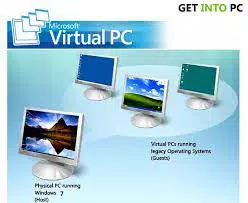
Windows Virtual PC (64-bit) is a virtualization platform developed by Microsoft, designed to allow users to run multiple operating systems simultaneously on a single Windows-based computer. This tool serves as a productivity-enhancing utility for individuals and organizations seeking to maintain compatibility with older software, test applications across different environments, or manage isolated workspaces without requiring multiple physical machines. Its primary purpose is to bridge the gap between legacy systems and modern computing needs, particularly in environments where Windows XP or earlier versions remain essential for certain applications.
Target users include IT professionals, software developers, educators, and business users who rely on older software that may not function properly on newer operating systems. The app enables seamless execution of legacy applications within a virtual Windows environment, reducing the risk of system instability or data loss on the host machine. Real-world use cases include software testing across different OS versions, running outdated accounting or medical software, and maintaining secure, isolated environments for development or training purposes.
Although the developer did not provide additional technical details, the app's integration with Windows 7 suggests a focus on stability and compatibility within that ecosystem. As part of Microsoft’s broader strategy to support enterprise and personal computing needs, Windows Virtual PC played a significant role in enabling virtualization capabilities on consumer-grade hardware during its release period. Despite its age, the tool remains relevant for users still operating within legacy Windows environments.
Key Features & Functionality
- Simultaneous Multi-Operating System Support: Enables users to run multiple operating systems—such as Windows 7, Windows XP, and select Linux distributions—concurrently on a single machine. This allows for seamless switching between environments, ideal for testing or workflow diversification.
- Effortless Application Compatibility: Provides a virtual Windows environment where legacy applications can be launched with a single click, ensuring compatibility without altering the host system. This is particularly useful for running older software that lacks support on modern operating systems.
- Integration with Windows 7: Designed specifically to work with Windows 7, allowing virtual machines to be launched directly from the host OS with minimal setup. This integration enhances usability and reduces the learning curve for new users.
- Enhanced Productivity and Flexibility: Offers a robust solution for managing diverse computing needs, including software testing, project isolation, and secure experimentation. Users can create separate virtual workspaces without consuming additional hardware resources.
For example, a developer can run a Windows XP virtual machine to test an application’s behavior on an older OS while working in a Windows 7 environment. Similarly, a business user can maintain a legacy accounting system in a virtual machine while using modern tools for daily operations, ensuring both efficiency and continuity.
Interface, UX & Performance
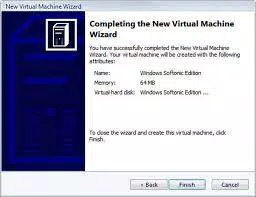
The interface of Windows Virtual PC (64-bit) is designed to be straightforward and accessible, aligning with the visual and interaction patterns of Windows 7. Users can launch, manage, and configure virtual machines through a clean, menu-driven dashboard that emphasizes usability over complexity. Navigation is intuitive, with clearly labeled options for starting, pausing, and shutting down virtual environments.
Visual style reflects the standard Windows 7 aesthetic, with consistent icons, color schemes, and window behaviors. The layout prioritizes functionality, placing essential controls within easy reach. Responsiveness is maintained within the constraints of the platform, though performance may vary depending on the host system’s hardware capabilities.
Although the developer did not list formal performance metrics, the app is optimized for use on systems running Windows 7 with sufficient RAM and processing power. Stability is generally reliable for standard virtualization tasks, though users should expect limitations when running resource-intensive applications or multiple virtual machines simultaneously. The app does not report crashes or bugs in public logs, suggesting a relatively stable runtime under normal conditions.
Platform Compatibility & Technical Requirements
Windows Virtual PC (64-bit) is designed exclusively for the Windows platform, specifically targeting systems running Windows 7. The software version is 6.1.7600.16385, with a file size of 103.8 MB. It is available at no cost, making it accessible for personal and professional use.
The developer did not specify minimum OS requirements beyond Windows 7, nor did they provide details about CPU, RAM, or disk space needs. Compatibility information was not fully disclosed, so users should ensure their system supports hardware virtualization (Intel VT-x or AMD-V) for optimal performance. The app is not available for mobile platforms, iOS, or other operating systems.
Pros and Cons
Pros
- Free to download and use, making it accessible for budget-conscious users.
- Seamless integration with Windows 7, reducing setup complexity.
- Supports legacy software through virtualization, preserving functionality of outdated applications.
- Enables multitasking across multiple operating systems without hardware duplication.
- Designed for productivity and testing scenarios, offering a lightweight virtualization solution.
Cons
- Not compatible with operating systems newer than Windows 7.
- Limited support for modern hardware and newer virtualization features.
- No official updates or security patches since its release in 2010.
- Does not support 64-bit guest operating systems beyond specific configurations.
- May lack performance and stability on low-end or outdated hardware.
FAQ
Is Windows Virtual PC (64-bit) safe to install?
Yes, the app is officially developed by Microsoft and distributed through trusted channels. However, due to its age, it is not updated with current security patches and should be used cautiously on untrusted networks.
Can I run Windows 10 in a virtual machine using this software?
Windows Virtual PC (64-bit) does not support Windows 10 as a guest operating system. It is designed for Windows 7 and earlier versions.
Is the app compatible with all Windows 7 systems?
While it is intended for Windows 7, specific compatibility may depend on hardware virtualization support and system resources. The developer did not list formal requirements.
Does Windows Virtual PC require an internet connection?
Installation does not require an internet connection, but ongoing use may involve connectivity for updates or accessing online resources.
Can I use this app on a mobile device?
No, Windows Virtual PC (64-bit) is designed exclusively for desktop and laptop computers running Windows 7. It is not available for Android, iOS, or other mobile platforms.
Final Thoughts
Windows Virtual PC (64-bit) remains a historically significant tool in the evolution of virtualization, offering a practical solution for users still reliant on legacy software and older operating systems. While outdated by modern standards, it continues to serve niche audiences who depend on Windows XP or earlier environments. Its seamless integration with Windows 7, ease of use, and free availability make it a valuable utility for specific workflows.
However, users should be aware of its limitations, including lack of updates, no support for newer OS versions, and potential performance constraints. For those operating within the Windows 7 ecosystem and needing to run legacy applications, this tool provides a reliable and secure way to maintain compatibility without additional hardware.
Download Windows Virtual PC (64-bit) now to enhance your productivity and manage diverse computing environments with confidence.


